
1. Adjust Meal Calories
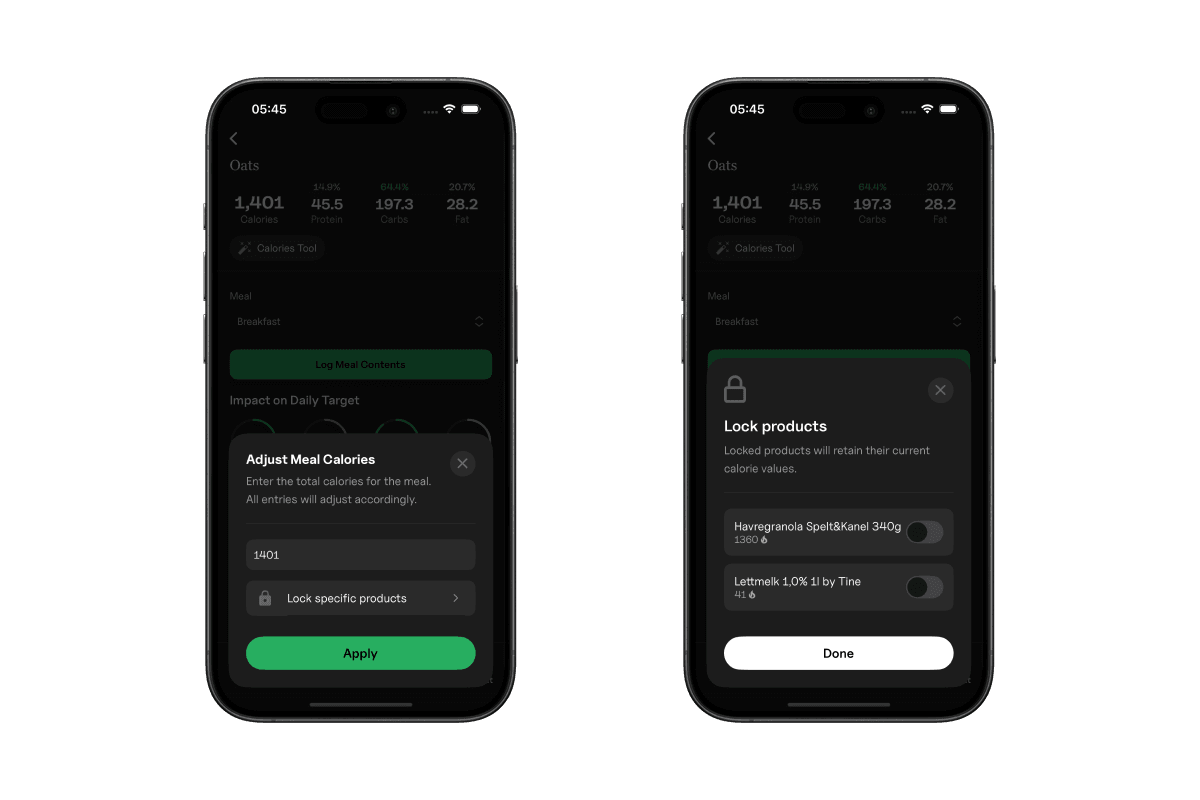
Gympal’s calorie tool lets you set the exact calorie target you want for any meal. Instead of adjusting every food product manually, you can enter a single number and the entire meal updates automatically.
It’s an easy way to scale meals up for bulking, trim them down for cutting, or match a specific calorie goal you’re trying to hit.
2. How the calorie tool works
Open any meal and tap the "Calorie Tool" button at the top. Enter your desired total calories, and Gympal will adjust all food products proportionally. This keeps the same macro ratio while giving you the exact meal size you need.
3. Locking one or more products
You can lock specific products inside the meal if you want them to stay fixed.
This is useful when there’s an entry you don’t want scaled, like keeping protein powder at one scoop, or keeping a serving of rice the same while adjusting everything else.
Locked products remain untouched, and Gympal adjusts the remaining food products to reach your target calories.
4. Why it’s useful
- Quickly adapt meals for cutting or bulking
- Hit precise calorie targets without manual math
- Keep macro ratios consistent when scaling meals
- Protect ingredients you don’t want changed
- Build multiple calorie versions of the same meal