
1. Create Supersets
Gympal lets you group exercises into supersets so you can perform them back-to-back with minimal rest. It’s great for saving time, increasing intensity, or pairing movements that work well together.
You can create supersets with two exercises or as many as you need.
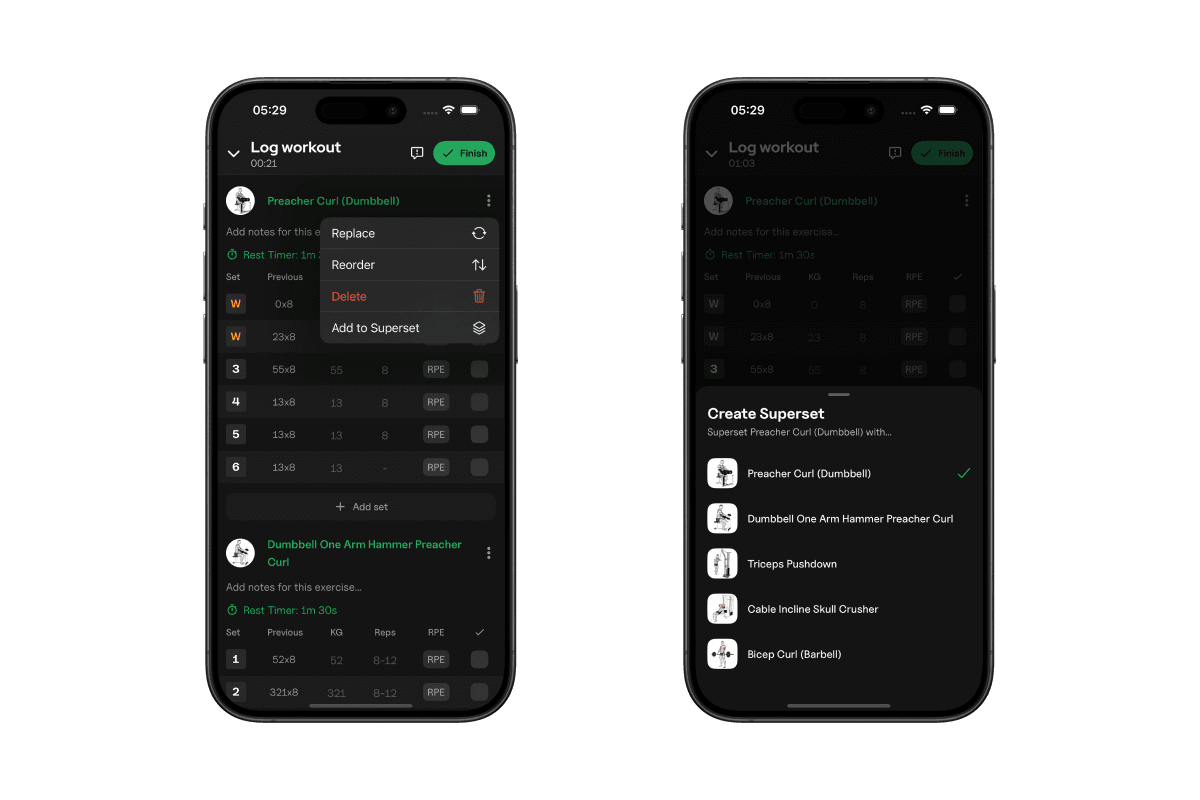
2. How to create a superset
- Add the exercises you want to your workout or routine
- Tap the three dots next to an exercise
- Select "Add to Superset"
- Choose the exercise you want to pair it with
The exercises will be grouped together automatically. You can drag to reorder them or remove one at any time.
3. Why it’s useful
- Train more efficiently
- Pair push/pull, upper/lower, or accessory movements
- Increase workout intensity without adding weight
- Keep your routine organized with grouped exercises
Supersets make your training faster and smoother, and Gympal keeps them easy to set up and manage.